Manage club
Menu bar

The menu bar allows you to manage all aspects of ClubGuests'
- Club Home links to your club's home page.
- Manual links to the ClubGuests manual which opens in a new window.
- Manage network is a dropdown list to manage network links, member verifications and custom offers.
- Manage club is a dropdown list to manage letters of introduction and default settings.
- there is also dropdown list to manage your ClubGuests login account.
Manage your club
Some features on the menu are not available to Covid-19 Priority Members.
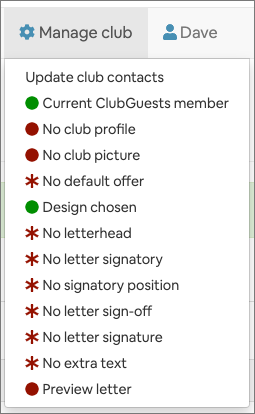
- items marked with
 are completed items, or items where no further action is needed.
 - items marked with
 are incomplete, non-required items or items not avaialable until required items are completed.
 - items marked with
 are incomplete, required items. You may not be able to add reciprocal links or issue letters of introduction unless these are completed.
 - some items may not appear on the menu until required items are completed.
- some items may not appear on the menu for non-ClubGuests members.
Club profile
- This menu item is available to ClubGuests members and non-members.
When people wish to visit your club using ClubGuests, you can provide some descriptive text about your club. This is is not your reciprocal agreement - that is dealt with elsewhere -. It is meant to be general text about your club’s activities.
Club picture
- This menu item is available to ClubGuests members and non-members.
A picture paints a thousand words. So here you can put in a nice picture of your club, or your members engaging in club activities.
Default offer
You can make an offer to any guests who are visiting your club. The idea is to increase traffic to your club and increase value for reciprocal club members.
Default agreement
When people wish to visit your club using ClubGuests, what is the default agreement? In other words, what are the services that you offer? For example it might be free and full use of all club facilities - or it might be restricted to certain services.
Accommodation
If your club offers accommodation, select the checkbox. Your club is listed with a 'bed' icon in lists and text in club detail panes.
Reciprocal links header
Use this to describe your reciprocal links page to your own members.
You can emphasise the benefits it brings and add in any advice on booking visits in advance.
-
This appears at the top of your ClubGuests reciprocal clubs page.
Some clubs may already offer visit advice.
Some existing ClubGuests members may already have entered their own advice to anyone planning a visit.
Letters of introduction
This is a critical item to set-up as it is the central function of ClubGuests.